
Xelion Phone System from Wicomms
The award-winning Xelion Phone System with direct owner-led support
Choosing a business phone system isn't just about features.
It's about finding a solution that's reliable, easy to use, and supported by people who genuinely understand your business.
That's why Wicomms supplies and supports the Xelion Cloud Phone System.
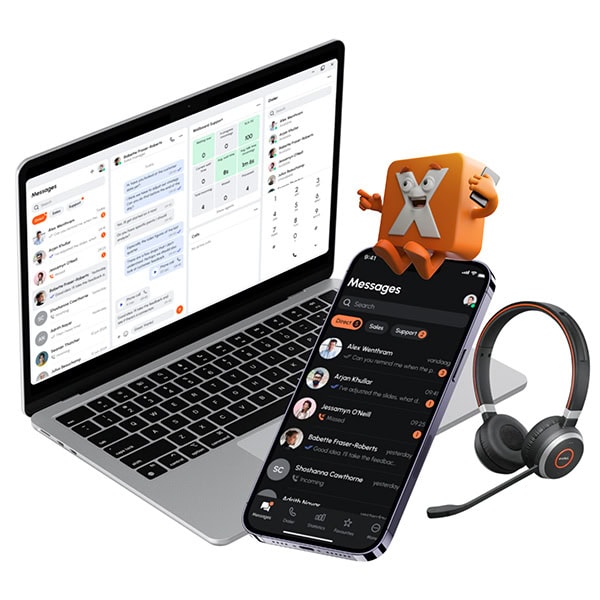
Trusted by more than 20,000 businesses, Xelion combines business telephony, mobile working and unified communications in a single platform. Whether your team works from the office, from home or on the move, Xelion helps keep your business connected.
What makes the experience different is the support behind it.
Unlike larger telecom providers, Wicomms offers direct access to the owner of the business. No call centres. No being passed between departments. Just straightforward advice, responsive support and a single point of contact when you need help.

Xelion: Trusted by 20,000+ businesses • Technology Reseller UC & Collaboration Vendor of the Year 2023, 2024 & 2025 • ISO 27001 Certified • From £12.50 + VAT per user per month • 2,000 minutes included per user
Why Wicomms Recommends Xelion
There are plenty of business phone systems on the market, all promising similar things.
Wicomms chose Xelion as its preferred cloud phone system because it strikes the right balance between functionality, flexibility and value for small and growing businesses.
The Xelion Phone System includes the features most businesses need without requiring multiple licence types or costly feature upgrades. Businesses benefit from call recording, call queues, auto attendants, the Xelion Mobile App, Xelion Microsoft Teams Integration and flexible call routing as standard.
For organisations with between 1 and 50 employees, it provides a modern communications platform that can grow alongside the business.

Why Businesses Choose Wicomms
Many telecom providers can sell a phone system.
The difference is what happens after the paperwork is signed.
Wicomms is intentionally structured differently from many larger providers. Customers deal directly with the owner of the business, creating a level of accountability, continuity and personal service that can be difficult to find elsewhere.
When support is needed, changes need making or advice is required, there is a single point of contact who understands both the customer and their setup.
Owner-Led Support
- Direct access to the business owner
- Consistent advice from someone who knows your account
- Faster decisions and fewer handovers
- No call centres
- No unnecessary escalation processes
- Personal accountability
For many customers, that level of support is every bit as important as the technology itself.
Transparent Pricing
All costs are clearly explained before you proceed, including setup, licences, number porting and hardware where required.
Fair Contract Terms
Wicomms believes customers should stay because they're happy with the service, not because they're locked into unnecessarily long agreements.
Local Service, Nationwide Support
Based in Tonbridge, Kent, Wicomms supports businesses across the UK.
What Is the Xelion Phone System?
Xelion is a cloud-hosted business phone system developed by Xelion B.V. and delivered in the UK through authorised partners such as Wicomms.
The Xelion Cloud Phone System allows employees to work seamlessly across:
- Desk phones
- Windows computers
- Mac computers
- iPhone devices
- Android devices
- Microsoft Teams
Because the platform is cloud-based, calls, contacts and business communications remain accessible wherever work happens.
Xelion is trusted by more than 20,000 organisations and has been named Technology Reseller UC & Collaboration Vendor of the Year in 2023, 2024 and 2025
What Makes Xelion Different?
Many cloud phone systems require additional licences to unlock important functionality. Xelion takes a simpler approach.
Every user licence includes the same comprehensive feature set, making it easier to budget, deploy and manage.
Key benefits include:
- Full feature set included
- Flexible business telephony
- Powerful mobile working capabilities
- Integrated call recording
- Advanced call handling
- Microsoft Teams integration
- Consistent user experience across devices
The result is a platform that delivers enterprise-grade functionality without unnecessary complexity.
Xelion Unified Communications
Business communication is about more than making and receiving calls.
Xelion Unified Communications brings together:
- Business telephony
- Mobile working
- Presence information
- Internal collaboration
- CRM integrations
- Call recording
- Reporting
- Microsoft Teams integration
This creates a connected experience for employees whilst helping customers reach the right person more quickly.

What's Included with Xelion?
Every Xelion licence supplied by Wicomms includes the full feature set as standard.
Unlike many business phone systems, there are no separate feature packs or expensive upgrades required to unlock functionality that most businesses would reasonably expect to be included.
Every User Gets
✅ 2,000 minutes to UK landlines and mobiles every month
✅ Xelion Desktop App for Windows and Mac
✅ Xelion Mobile App for iPhone and Android
✅ Microsoft 365 integration with calendars and contacts
✅ Xelion Microsoft Teams Integration with Teams presence visibility
✅ Voicemail-to-Email
✅ Call Recording with 30 days' included storage per user
✅ Unlimited Auto Attendants (IVRs) for professional call handling
✅ Unlimited Hunt Groups for intelligent call routing across teams and departments
✅ Call Reporting to help monitor call volumes, missed calls and team activity
✅ Mobile Twinning, allowing desk phones and mobiles to ring simultaneously
✅ More than 300 business telephony features included as standard
Built for Modern Businesses
The Xelion Cloud Phone System combines business telephony, mobile working, unified communications and professional call handling within a single platform.
Whether your team works from the office, from home or on the road, they have access to the same features and functionality wherever they are.
Xelion Mobile App
The Xelion Mobile App allows users to make and receive business calls using their business number from an iPhone or Android device.
This helps businesses support hybrid working whilst maintaining a professional image and keeping business and personal communications separate.
Xelion Microsoft Teams Integration
Many businesses already rely on Microsoft Teams through Microsoft 365.
Xelion Microsoft Teams Integration helps bring telephony and collaboration together, making it easier to see colleague availability, launch calls quickly and improve communication across the business.
Xelion vs Microsoft Teams Phone
Businesses often ask whether they should choose Xelion or Microsoft Teams Phone.
Both platforms support business communications, but they approach telephony differently.
Xelion is a dedicated business phone system designed around professional call handling, reporting and business telephony.
Microsoft Teams Phone extends Teams with calling capabilities and may require additional Microsoft licences depending on your requirements.
Many businesses choose Xelion because it provides advanced telephony functionality whilst still integrating with Microsoft Teams.
Who Is Xelion Suitable For?
The Xelion Business Phone System is particularly well suited to:
- Professional services firms
- Accountants
- Estate agents
- Healthcare providers
- Construction companies
- Trade businesses
- Multi-site organisations
- Customer service teams
- Remote and hybrid teams
- Businesses with 1-50 employees
If your organisation relies on professional communication and flexible working, Xelion is likely to be a strong fit.
Book a Xelion Demo
Thinking about a new business phone system?
Book a free Xelion demonstration and discover whether it's the right fit for your business.
You'll get straightforward advice, a closer look at the platform and a clear understanding of how Wicomms can help.

Xelion Phone Systems – Frequently Asked Questions
Compare Xelion phone systems for UK businesses, including VoIP, cloud telephony, pricing, features, integrations, providers and customer reviews.
Xelion phone systems use a cloud-based communications platform that combines VoIP calling, internal communication and customer contact in one platform. Instead of depending on a traditional office exchange, employees use the Xelion phone system on supported desk phones, computers and mobile devices, with business numbers and call-handling rules managed centrally.
When a customer calls, the business can send that enquiry to reception, a call group, a queue or an individual colleague. The platform includes availability statuses, schedules, voicemail and fallback routing, so callers do not have to know whether somebody is working from home or sitting in the office. Employees can also check previous contact and find colleagues without changing systems.
Consider a UK engineering supplier with a sales office and travelling account managers. A customer asking about an urgent delivery can be passed to the available team rather than being given several separate telephone numbers. Xelion unified communications also supports business chat and other communication channels, although the exact optional services depend on what the company buys.
Unlike a basic VoIP line that chiefly replaces a desk phone, Xelion is designed to manage how a whole business handles conversations. The system is supplied in the UK through accredited Xelion partners, who configure it and provide day-to-day support. The result should be a clearer route from a customer's first call to the employee who can help.
Yes. Xelion has a dedicated Microsoft Teams app that allows users to make business calls and work with Xelion telephony from inside Teams. The Xelion Microsoft Teams integration supports calling, colleague statuses, call queues, recordings and reporting, while the platform supplies business calling.
The published Teams offer says the app is included with user licences and does not require a separate Microsoft Phone System licence for the described configuration. The platform also supports synchronising presence between Teams and Xelion, and Microsoft Entra ID can be used for single sign-on. Your partner should confirm which functions and subscription terms apply to your Microsoft tenant.
Imagine a UK accountancy practice already using Microsoft Teams for internal meetings. Its reception team needs call groups and queues, while accountants want customer calls to appear in their familiar workspace. Xelion phone systems with Teams integration may allow those tasks without forcing employees to use a separate calling interface daily.
Ask to see a live inbound call, a transfer to a busy colleague and the reporting screen within Teams. Also check emergency calling, external telephone numbers, supported devices and existing Microsoft licence requirements. Check the scope and limitations of the Xelion Teams app with the provider. A working demonstration makes the difference between genuine integration and a marketing claim.
Yes. Xelion phone systems can connect business telephony with CRM and other workplace software, but the functions depend on the specific connector. The platform provides a documented REST API, and Xelion also has an integrations marketplace. That is more useful than a general promise that the system 'works with your CRM'.
For example, a compatible integration may display a customer record when a call arrives, allow click-to-call from a contact or help record an interaction against an account. Those are different tasks. Data synchronisation, screen-pop behaviour, permissions and the ability to write notes back to the CRM should each be tested separately before the business relies on them.
A UK recruitment agency might want consultants to recognise candidates immediately. An engineering distributor may need call activity linked to quotations, whereas a solicitor's office may restrict which client details reception can see. With Xelion CRM integration, the quality of the connection matters more than the number of software logos displayed in a sales presentation.
Check your CRM's exact name and edition against Xelion's supported integrations. Ask whether a third-party connector, additional subscription or custom API work is required. Have the partner demonstrate a real incoming call, an unmatched number and a completed follow-up. A suitable connection should save searching and retyping without exposing information to the wrong employees.
Yes. Xelion supports remote and hybrid working because employees can make and receive business calls through its Windows, macOS, iOS and Android apps, as well as supported desk phones. Xelion cloud phone systems can serve staff in an office, at home or travelling, without publishing personal mobile numbers to customers.
Staff can set their availability and working preferences, while call groups and forwarding rules determine where incoming enquiries go. Xelion also supports Microsoft 365 calendar synchronisation, which can help status information reflect appointments. A mobile app is useful, but routing and clear responsibility for unanswered calls are what make hybrid communication work properly.
A UK insurance brokerage may have advisers at home two days a week and administrators on site. A customer still needs one reliable contact route, not a list of home and mobile numbers. For a construction company, Xelion mobile calling may help site managers speak to suppliers while office staff continue handling general enquiries.
Test the Xelion apps on office broadband, home Wi-Fi and mobile data. Check incoming-call alerts, headset compatibility, roaming, voicemail, out-of-hours rules and what happens when someone's connection fails. Decide which staff should remain reachable and when their working day ends. Hybrid flexibility is valuable only when it improves customer access without creating an expectation that everyone is permanently on call.
Xelion pricing in the UK is quoted by an accredited provider, not advertised as a universal price. Xelion describes a fixed base price per user covering core calling, chat, reporting and updates, with optional Xelion Plus services priced separately. The final cost depends on users, connectivity, installation and optional services.
Ask for a breakdown of monthly user licences, call charges or allowances, numbers, hardware, broadband dependencies and one-off setup costs. Check separately whether CRM connectors, WhatsApp Business, Xeli Assistant or Xelion Analysis create additional charges. Xelion says core call-management functions are included, so request a clear explanation of any items shown as separately chargeable.
A UK consultancy with ten employees may mostly use laptops and mobiles, while a customer support business with ten employees could need desk handsets, headsets, complex queues and staff training. Their Xelion phone systems may have the same licence count, but the installation and total cost of ownership may differ. Avoid comparing a bare per-user figure with another provider's fully supported package.
Get the total price over the full proposed agreement, including VAT, annual increases, minimum term, number porting, support response times and early cancellation charges. Xelion pricing is supplied through its partner network, so obtain a tailored quotation. A useful buying decision compares the full cost with the value of fewer missed enquiries, faster handling and simpler administration, rather than headline price alone.
Xelion phone system features include calling, voicemail, call groups, queues, call forwarding, availability management and reporting. Xelion telephony brings these tools together under centrally managed call rules. That makes Xelion more than an internet replacement for an ordinary telephone line.
Employees can use Xelion on supported computers, mobiles or desk phones. Other advertised functions include contact history, internal communication, call pickup, hot desking and scheduling. For a busy reception desk, it matters that staff can see who is available and decide where a call goes when the intended colleague cannot answer. Managers can inspect call volumes and waiting times rather than guessing.
A UK legal practice might configure a main reception group and private direct contacts for fee earners. A distributor could use different call groups for sales, accounts and dispatch. These businesses need different call flows, but both benefit when the system is built around the calls customers actually make, not a feature checklist.
Separate the included features from Xelion Plus extensions such as Xeli Assistant, Xelion Analysis and WhatsApp Business. Ask the partner to show menus, routing, reporting and recordings in the package proposed, and to explain permission settings. A well-configured Xelion phone system gives employees a simple way to answer, transfer and follow up calls, while management can identify where customers get stuck.
Usually, yes. Businesses moving to Xelion telephone systems can generally keep eligible UK business numbers through number porting. Xelion says its accredited partners arrange the process, but eligibility and timing still depend on the existing provider and number type. Do not cancel your old telephone service before the transfer has been agreed.
Start by listing every main number, direct dial, freephone number and number used by a particular branch or department. Identify services such as alarms, payment terminals, entry systems and fax lines that might depend on the old connection. Number porting does not migrate these functions.
A UK estate agency with a long-established local number might have it printed on window displays, property boards and advertising. Keeping that number helps prevent customers from ringing an obsolete line. A multi-site accountancy firm may have separate branch numbers that must continue reaching the right teams after the switch to Xelion hosted telephony.
Ask your Xelion partner for a number-by-number porting schedule, planned switch date, test plan and fallback arrangement. Check what happens to calls while the transfer is being processed and whether there are fees from either provider. Keep the old service active until your partner confirms the correct steps. The objective is a change of technology without changing familiar customer contact details.
No. Xelion phone systems do not require every employee to use a traditional desk phone. Its business calling apps support Windows, macOS, iOS and Android, allowing suitable computers and mobiles to act as work phones. Businesses that prefer dedicated hardware can also use compatible desk phones, cordless devices and headsets with the Xelion platform.
Xelion lists certified equipment brands including Yealink, Snom, Gigaset, Jabra, EPOS and Fanvil. Certification applies to suitable models and configurations, not every product carrying those names. A receptionist may prefer a handset with clearly accessible call controls, while a sales manager travelling between customers may prefer the Xelion mobile app and a headset.
In a UK architecture practice, employees might move between desks and meeting rooms. Xelion supports hot desking, allowing staff to sign in to suitable shared equipment rather than being tied to one location. A small consultancy might choose laptop calling for most users and keep only one dedicated phone at the front desk.
Before buying equipment, test audio quality, transfer controls, call notifications, headsets, Bluetooth connections and accessibility needs. Make sure existing hardware is on the provider's supported list and that users understand how to switch devices. The most economical Xelion phone system is not necessarily the one with the fewest handsets; it is the setup that gives each employee a reliable, convenient way to take business calls.
Xelion phone systems can reduce missed customer calls by using call groups, queues, availability statuses and fallback routing. It cannot guarantee that every caller reaches a person, but it can make unanswered enquiries easier to identify and manage. Xelion's call-management tools let businesses choose what happens when a queue becomes busy or a colleague is unavailable.
For example, a company can decide which employees ring first, how long callers wait and when a call moves to another group or voicemail. Xelion also offers reporting on incoming call volumes and average waiting times. Those figures help separate a routing problem from a staffing problem, because technology cannot replace available staff.
A UK emergency maintenance business may lose an urgent job when a customer abandons a queue. An accountancy practice could lose a prospective client if reception never returns a missed enquiry. With Xelion telephony call routing, each organisation can design a different fallback: another team, a message, a callback route or a clearly managed voicemail process.
Measure the number and proportion of missed calls, peak waiting times and callback speed before and after installation. Review the findings by team and time of day. Give someone responsibility for every callback. The commercial benefit is not a promise of zero missed calls; it is fewer lost opportunities and a more dependable response to customers.
Yes. WhatsApp Business is available as an extension to Xelion through Xelion Plus. It allows incoming WhatsApp messages to be handled alongside business calls in Xelion phone systems, with shared visibility of the conversation. Xelion presents this as a team messaging capability, not merely a private WhatsApp account on one employee's mobile phone.
The published WhatsApp Business integration lets staff see earlier messages, claim or assign an enquiry and pass a conversation to another colleague. That helps when the first person to respond is absent the following day. A business should still check how its WhatsApp Business account is connected, what messaging permissions apply and whether an additional licence or usage charge is involved.
For a UK vehicle servicing company, one customer may telephone to arrange a booking and later send a WhatsApp message about a collection time. Xelion customer messaging can help colleagues avoid replying twice or giving conflicting updates. A recruitment agency may use the same shared approach for appointment questions, with clear rules on who responds and how quickly.
Ask the Xelion provider to demonstrate a message arriving, being assigned, answered and handed over. Check access controls, customer consent, retention and out-of-hours expectations before launch. Confirm the supported WhatsApp workflow and any associated charges with the provider. The advantage is a managed business conversation that can continue even when individual employees are away.
Xelion Plus is Xelion's range of additional services for businesses that need more than the core package of Xelion phone systems. The named extensions include Xeli Assistant for AI-assisted contact handling, Xelion Analysis for conversation insights and WhatsApp Business integration. They differ from the core calling, queues and reporting functions.
Xeli Assistant can answer routine enquiries, gather information and pass calls to staff. Xelion Analysis works with conversation transcripts to identify why customers contact a business and the themes that occur repeatedly. WhatsApp Business enables a team to manage customer messages within the same communications environment. Each feature has a different purpose.
A UK property management company may want AI support for appointment queries outside normal hours. A customer service operation may find analysis more useful because it needs to spot recurring complaints. A small consultancy could gain more from shared WhatsApp messages than from automating phone calls. The right Xelion Plus option follows the customer's problem, not a fashionable technology label.
Ask for an itemised quote and a demonstration of each proposed extension. Clarify languages, human handover, data protection, user permissions and whether any usage-based fees apply. Compare these costs with the existing call workload and set a measurable goal. Xelion Plus should be an optional improvement to a working phone system, not a reason to buy complexity that staff will not use.
Yes. Xelion phone systems can be extended with Xeli Assistant, an AI-powered tool that can answer incoming calls, ask what the caller needs, provide information, book appointments, record callback requests and transfer calls to people. Xelion promotes the assistant as part of Xelion Plus, so it should be treated as an additional capability rather than a basic licence feature.
A business can use Xeli Assistant at the first point of contact, during busy periods or outside normal opening hours. The critical question is what the assistant is authorised to do. Routine opening-hours enquiries may be suitable for automation; complex complaints, sensitive personal information or regulated financial advice may need a human immediately.
Imagine a UK property maintenance firm receiving repeated calls about appointments while engineers are on site. The Xelion AI assistant might collect a customer's reason for calling and arrange a callback. A financial advice practice would need much tighter rules about what information the assistant may give and when an authorised employee must take over.
Test unclear accents, interrupted answers, unusual questions, requests for a person and incorrect information. Ask whether call details are passed to staff with context, how mistakes are reviewed and which data is stored. A useful Xeli Assistant deployment reduces avoidable interruptions while protecting complex conversations. Success is measured by resolved routine enquiries and safe handovers, not call volume alone.
Yes. Xelion phone systems include call reporting and offers recording-related functions, subject to configuration and permissions. Its published call-management features include reports on incoming calls and waiting times, with options to have reports delivered by email. Xelion Analysis is a separate extension for deeper transcript-based insights.
Basic reporting can show when queues become busy, how long people wait and where calls are not being answered. Call notes and communication history help teams pick up previous conversations. Recording can support quality assurance and coaching where it is lawful, while Xelion Analysis goes further by examining transcripts, topics and customer sentiment. Evaluate those functions separately.
A UK service desk may want to compare weekday call peaks with employee availability. A sales manager might examine missed enquiries and callback times, not listen to every recording. A complaints team may benefit from identifying repeating issues that lead customers to contact the business again. Xelion reporting becomes valuable when managers use the information to change staffing or processes.
Before activating recordings or analysis, address UK GDPR, privacy notices, lawful basis, access permissions and retention settings. Confirm how recordings are retrieved, exported and deleted, and whether any special transcription or analysis charges apply. Ask for sample reports using the same measures you plan to monitor. Better decisions should follow the data; collecting more conversations without purpose is not a business outcome.
Xelion phone systems have published security and privacy controls, including encryption, user permissions, data retention settings and a choice of data centre arrangements. The company also states that it holds ISO 27001:2023 certification and uses independent security testing. These are meaningful assurances, but a business still needs to check its own configuration and contractual obligations.
Administrators can restrict access to conversations, queues, recordings and management functions. Xelion describes privacy settings that limit visibility unless access is deliberately enabled, alongside configurable retention periods. Its published Trust Centre and security information are useful starting points for assessing how the provider protects customer data rather than accepting an unsupported 'fully secure' claim.
A UK law firm may need strict separation between sensitive client matters. A healthcare provider could require careful control over who hears messages, while a financial services firm must consider its own regulatory responsibilities. Even a small business should use appropriate sign-in controls and remove access promptly when an employee leaves or loses a device.
Ask your Xelion partner which data centre and data-processing terms will apply, who acts as processor, which integrations share data and how incidents are reported. Review permissions after installation, especially for recordings and AI tools. Request current Xelion security and privacy documentation before signing. A safe deployment combines supplier controls with the business's own security policies, training and checks.
An internet or power failure can interrupt Xelion calling at the affected location because it is a cloud-based VoIP phone system. The platform may be online even when staff are disconnected. Whether calls can reach another device or destination depends on how your provider has designed the routing and backup arrangements.
Plan separately for office broadband failure, Wi-Fi problems, power cuts and mobile coverage gaps. A second connection, suitable mobile data or predetermined call forwarding may allow some employees to keep working, subject to testing. Routers, network switches and powered handsets may also need backup electricity if local calling must continue during a power cut.
A UK emergency repair firm should decide who receives urgent calls if its office goes offline. A solicitor's practice may need a separate fallback reception number so clients can still reach an employee. In either case, Xelion phone systems need a written business-continuity procedure that identifies who changes routing and alerts staff.
Ask the partner to simulate an outage while you watch what happens to a new caller, a queued call and an employee using a mobile app. Check how service is restored and whether emergency calling still works in each scenario. The practical benefit of Xelion VoIP is flexibility, not immunity from network problems. A tested fallback plan protects customer access when ordinary business connections fail.
Yes. Xelion business phone systems are suitable for consideration by small businesses and growing SMEs. Xelion says there is no minimum user requirement and that its partner-delivered service can work for a team of three as well as a larger organisation. What matters is whether the chosen Xelion cloud phone system meets the business's actual communication needs affordably.
A small firm might begin with a main business number, working-hours rules, voicemail and a few mobile or desktop users. As enquiries increase, it may need call groups, queues, reporting or integrations with customer records. Xelion's base functionality supports these more structured workflows, but each extra requirement still needs clear setup and employee training.
Consider a UK recruitment agency growing from four consultants to twenty. At first, individual direct lines may be enough. Later, a shared candidate-enquiry group and availability view could help prevent calls being lost when somebody is interviewing. A three-person consultancy may never need that level of call management.
Ask how easily your partner can add and remove users, change groups, assign new numbers and provide support as staff change. Confirm the minimum contract commitments and charges for unused licences. Also check whether the system remains manageable without a dedicated IT team. Growth should mean the telephone arrangement can adapt to the work, not that the business must pay for every available feature immediately.
Setting up Xelion phone systems can be straightforward for a small business, but there is no reliable standard installation time for every organisation. The timescale depends on user numbers, number porting, connectivity, existing contracts, desk phones, call routing and integrations. A Xelion UK partner should assess these before setting a switch date.
The project normally involves confirming the current numbers, agreeing call groups and opening hours, configuring users and devices, testing connections and arranging any porting. Employees also need to practise answering, transferring and recovering calls. A larger business may need a pilot with one team before migrating multiple departments or locations, particularly with CRM and Teams.
For a UK accountancy practice, changing the main client line during a busy deadline period could disrupt service. A retailer with several branches might need staged number transfers and separate call queues. In both cases, a controlled Xelion migration is preferable to rushing a technical installation without checking what customers will hear on the day.
Your accredited Xelion partner is normally the first-line support contact after go-live, with Xelion providing second-line assistance to partners. Ask for the implementation plan, user training, support hours, fault escalation route and service response commitments in writing. A successful switch is one where customers continue reaching the right people with reliable follow-up support.
Contract lengths for Xelion phone systems, cancellation terms and support commitments depend on the accredited UK partner supplying the service. Xelion says partners draw up customer agreements and manage implementation and ongoing support. There is no universal contract term or cancellation fee. Get written details before signing.
Ask whether you are agreeing to a minimum term, how renewals work and how much notice is required to leave. Check what happens when employee numbers fall, whether unused licences can be removed and how annual price changes are calculated. Separate Xelion user subscriptions from any finance agreement for desk phones or other equipment; their terms may differ.
A UK marketing agency may expect to add and remove staff regularly. A multi-site service company could have purchased hardware and number porting alongside the monthly Xelion phone system. For both, a low introductory price means little if reduction, support or exit terms make a future change expensive. Ask how the provider would return numbers and export permitted customer information when the agreement ends.
Support should be just as specific: establish first-line helpdesk hours, out-of-hours emergency cover, response targets and who pays for changes to call routing. Xelion phone system providers operate under partner-based support arrangements, but your contract controls the service you receive. Compare the full lifetime cost and exit process with competing phone systems. Clear terms prevent expensive surprises.
Xelion phone systems and HiHi are both UK-market business phone options, but they emphasise different ways of working. Xelion promotes a software-led cloud communications platform across computers, mobiles and supported desk phones. HiHi promotes its own touchscreen business deskphone experience alongside mobile and desktop calling through its associated apps. Neither approach is automatically better for every company.
An important distinction is hardware choice. Xelion supports certified devices from several suppliers, including Yealink, Snom and Gigaset, as well as desktop and mobile apps. HiHi places its touchscreen deskphone at the centre of the experience, although it also offers cross-device calling. Both advertise call management and reporting features.
For a UK professional practice whose staff regularly work from home, compare how easily users switch between laptops, mobiles and office handsets. A reception-heavy business may place greater value on a dedicated touchscreen interface. Test call transfers, colleague presence, CRM integration, recordings and reporting in the same demonstration.
Xelion also has a published Microsoft Teams app and optional Xelion Plus tools, while HiHi advertises its own call insights and connected applications. Ask both suppliers for like-for-like written quotes covering hardware, licences, support, number transfers, contract length and exit costs. The best Xelion versus HiHi decision is the one that gives employees a reliable daily workflow at a justifiable lifetime price.
Xelion phone system reviews highlight strengths and weaknesses but cannot replace a demonstration in your business. Look for feedback about everyday call handling, reliability, sound quality, ease of use and the standard of technical support. Separate comments about the Xelion platform from comments about the company supplying and configuring it.
When researching Xelion UK customer experiences, consider the date of each review, the size of the business and the devices or integrations being used. A complaint about an older mobile application may not reflect the current version. Equally, a positive review from a small office may tell you little about managing several busy call queues. Look for recurring themes rather than relying on a single rating.
For example, a recruitment agency should investigate call transfers and CRM connections, while an insurance brokerage may prioritise recording permissions and dependable access to advisers. Ask Xelion phone system providers to demonstrate these workflows with realistic test calls. Request references from businesses with comparable requirements and ask how installation problems were resolved.
Before buying Xelion phone systems, compare the itemised quotation, support commitments, implementation plan and exit terms with alternative providers. Record which demonstration scenarios pass and which need further work. The most useful review evidence is information that helps you judge whether the proposed configuration will solve your communication problems without creating unnecessary costs or disruption.
