MobeX Touch: More Than a Desk Phone
The intelligent business communication hub that combines calling, collaboration and business apps in one device.
Traditional desk phones were designed for making calls. Modern businesses need much more than that.
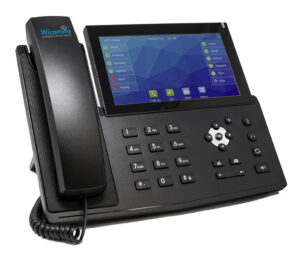
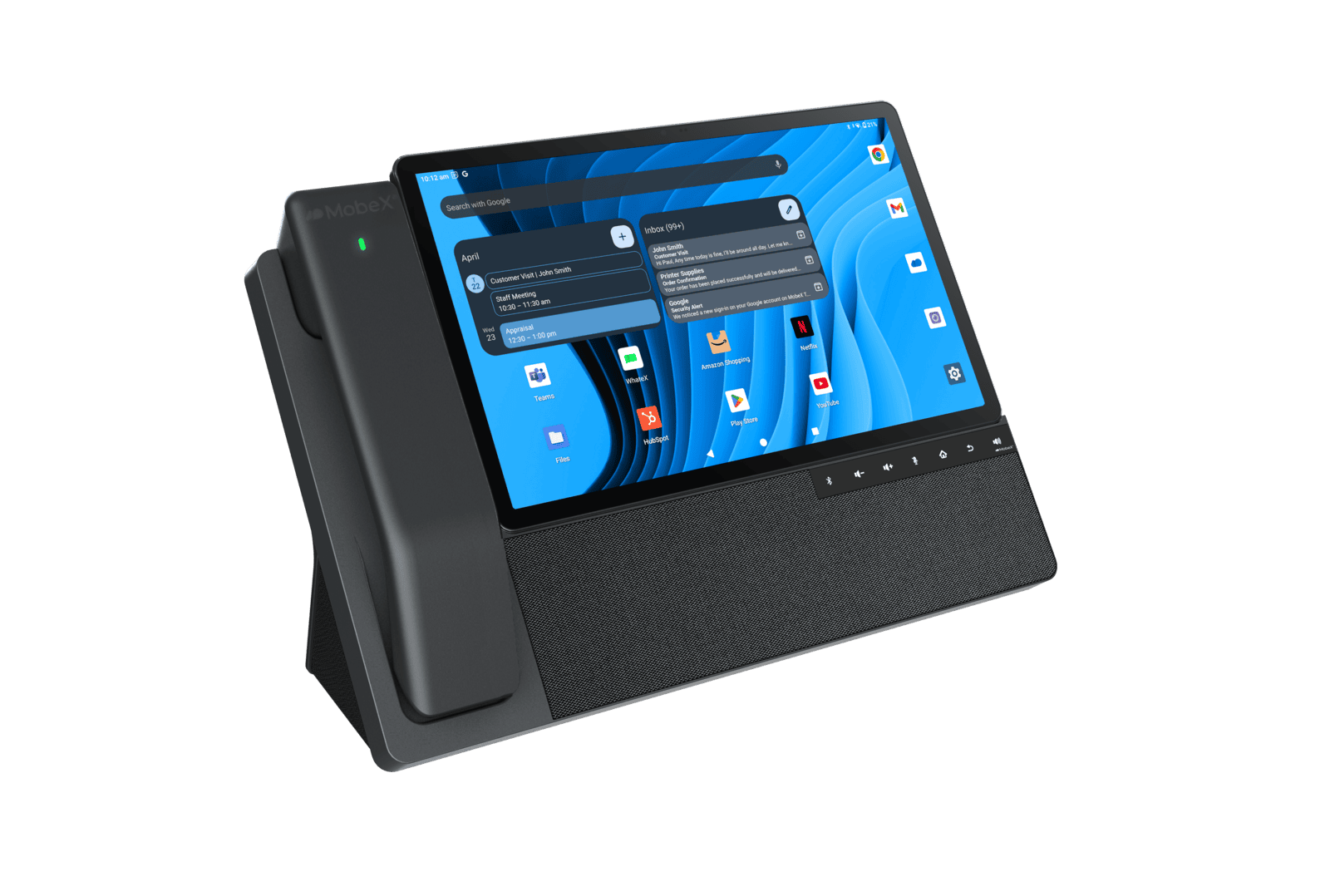
MobeX Touch combines a professional business phone, Android tablet and cloud phone system (VoIP) into a single device, giving your team instant access to calls, contacts, CRM data and business applications without switching between devices.
From £49.99 + VAT per user/month (36‑month user licence + MobeX Touch bundle)
Or purchase MobeX Touch outright from £1,099 + VAT (licence from £13.75/month)
Modern business communication, without traditional phone limitations
Traditional desk phones were built for a different way of working.

What's actually running under the screen

- Android Operating System: Install compatible business apps directly from Google Play.
- 10.9" HD Touchscreen Display: Large, responsive display designed from everyday business use.
- Integrated Cloud Phone System: Access all MobeX calling functions including: Business calls, Call history, Company directory, Presence status, Voicemail, Notifications
- HD Audio & Video: Professional quality communication for both internal teams and customers.
- LTE Mobility Option: Choose the LTE version for additional flexibility when working away from fixed internet connections.
Powered by the MobeX Platform
MobeX Touch becomes even more powerful when combined with the wider MobeX communications platform.
Your team gains access to:
- Cloud phone system (VoIP)
- Company directories
- Presence information
- Messaging
- CRM integrations
- Call history
- Voicemail management
- Video conferencing
All through a single, connected experience.
Why businesses are moving beyond traditional desk phones & towards MobeX Touch
For years, desk phones have been reliable tools for business communication.
The problem is that modern work doesn't happen in one place.
Teams move between desks, meetings and customer conversations throughout the day. Customer information lives in CRMs. Collaboration happens through apps and video meetings.
Traditional handsets weren't built for that reality.
MobeX Touch bridges the gap between a desk phone and a modern workspace, helping your team communicate more effectively while staying productive
Who MobeX Touch Is For
MobeX Touch is ideal for businesses looking for more flexibility than a traditional desk phone without changing the way their teams communicate.
- Employees who regularly move around the workplace: Stay connected between desks, meeting rooms and shared workspaces without losing access to calls and contacts.
- Teams that rely on business applications throughout the day: Keep your phone system, CRM and essential apps together on a single device.
- Businesses frustrated by switching between multiple devices: Manage calls, customer information and daily tasks from one intuitive workspace.
- Organisations modernising their communications: Upgrade from traditional desk phones to a smarter, more flexible solution.
- Businesses that want flexibility without sacrificing professionalism: Enjoy the reliability of a dedicated business phone with the convenience of a detachable tablet.
Why Choose Wicomms?
- Expert setup and configuration
- UK-based support
- Number porting assistance
- User training
- Ongoing account management
- Advice tailored to your business
FAQs about MobeX Touch
Common questions about MobeX Touch business phones, features, costs and comparisons.
MobeX Touch is an Android-powered business communication device that combines a professional desk phone, touchscreen tablet and cloud-based telephone system into one connected workspace. It allows employees to make business calls, access customer information, use compatible applications and communicate with colleagues without constantly switching between separate devices.
Unlike a conventional office telephone, MobeX Touch features a 10.9-inch HD touchscreen running Android. Employees can access company directories, call history, voicemail, presence information and compatible business applications directly from the device. The integrated MobeX cloud phone platform uses Voice over Internet Protocol (VoIP), meaning business calls operate through an internet connection rather than a traditional telephone line.
For example, a sales representative can speak with a customer while accessing relevant CRM information. A receptionist can check colleague availability before transferring a call, while a manager can move between telephone conversations, messaging and video meetings using the same communication platform.
MobeX Touch is particularly relevant to UK businesses that want to modernise their communications without losing the familiar experience of a dedicated office phone.
Supplied by Wicomms, MobeX Touch also comes with access to professional configuration, user training and UK-based support. The practical benefit is a more connected working environment where employees can access essential communication tools and customer information with fewer interruptions.
MobeX Touch can give employees access to compatible CRM applications, but the precise systems supported and the level of integration must be checked before purchase. Using a CRM application on an Android device is not necessarily the same as linking telephone calls directly to customer records.
For example, a sales adviser may want to open an account record during a call. A customer service employee might want the caller's record to appear automatically, or need calls logged against the right contact. Those are different requirements. The first may involve application access, while automatic record matching, click-to-call or call logging can depend on specific integrations, licences and configuration.
Before selecting MobeX Touch, list the CRM products your business uses and the actions employees need to perform. Ask Wicomms to confirm support for each one, including any limits on app versions, authentication or features. If a particular integration is important, request a demonstration using a realistic workflow rather than relying on a general compatibility statement.
The practical benefit of getting this right is fewer interruptions during customer conversations and less duplicate administration. The risk of skipping the checks is buying a device that can open an application but cannot carry out the telephone-to-CRM tasks your team expected. Confirm the required functions in writing before agreeing to the proposed package.
Yes. MobeX Touch can form part of a hybrid working communication system, particularly for organisations that want office-based employees and remote colleagues to use a connected business telephone platform. The wider MobeX service includes desktop and mobile applications alongside dedicated communication devices.
Hybrid working creates challenges when employees use different telephone numbers, devices and communication methods. Customers may struggle to reach the right person, while colleagues can find it difficult to see who is available or manage calls consistently between locations.
MobeX Touch provides a dedicated Android-powered communication device for suitable working environments. Employees can use its touchscreen to access calling functions, contacts, voicemail and compatible applications. Meanwhile, colleagues working from home or travelling can use appropriate desktop or mobile applications within the wider MobeX platform.
For example, a UK consultancy might have reception staff working from its main office, account managers visiting customers and administrative employees working remotely. A connected communications system can help these teams remain accessible without relying entirely on separate personal telephone arrangements.
The available LTE version of MobeX Touch may also offer additional connectivity options, although businesses should confirm the relevant network and service requirements.
Successful hybrid working still depends on reliable connectivity, appropriate devices and correctly configured user accounts.
The main benefit is flexibility.
Yes. MobeX Touch supports video communication through its Android-based interface and compatible business communication applications. This allows employees to use the device for more than traditional telephone calls, bringing voice communication, video conversations and digital collaboration into one working environment.
For businesses that regularly speak with customers, suppliers or colleagues remotely, video communication can be particularly useful. A sales representative might need to discuss a proposal face-to-face with a prospect, while an account manager could use a video meeting to review documents or explain a service.
MobeX Touch features a 10.9-inch HD touchscreen, providing a larger viewing area than conventional business desk phones. Its Android operating system also allows access to compatible applications, although support for individual video meeting platforms and their features should be confirmed before installation.
The wider MobeX cloud communications platform supports collaboration alongside business calling, helping employees manage different types of conversations within a connected system.
For UK businesses with hybrid working arrangements, MobeX Touch can complement desktop and mobile communication applications. Office-based employees can use a dedicated communication device while colleagues working elsewhere access appropriate tools through the wider platform.
Before choosing MobeX Touch for video meetings, businesses should check application compatibility, camera requirements, internet performance and the features employees need.
No. MobeX Touch uses the MobeX cloud phone system over a suitable internet connection, so it does not require a traditional analogue business telephone line for normal VoIP calling. It can replace existing office desk phones, although a full migration depends on your current equipment, connectivity and calling requirements.
For businesses upgrading older telephone systems, MobeX Touch offers familiar calling functions alongside modern features such as company directories, voicemail management, presence information, messaging and video communication. Employees can also access compatible Android business applications from the device.
Replacing an existing telephone system involves more than installing new hardware. Businesses need to consider their current telephone numbers, internet connectivity, user requirements and any specialist equipment connected to their existing system.
Wicomms supports UK businesses through this transition by providing MobeX Touch configuration, number porting assistance, user training and ongoing account management. This helps organisations plan their move to cloud communications rather than leaving employees to manage the change themselves.
Importantly, MobeX Touch does not have to be the only device used throughout the organisation. The wider platform supports desktop and mobile applications, while traditional desk phone options remain available for employees with simpler requirements.
MobeX Touch combines business calling, touchscreen controls, Android applications and cloud communications in one device. Its main features are designed to help employees manage telephone conversations, access information and communicate with colleagues without constantly moving between separate systems.
The device features a 10.9-inch HD touchscreen, giving employees a tablet-style interface for everyday communication tasks. Through the MobeX cloud phone platform, users can access business contacts, call history, voicemail and colleague availability. HD audio supports clearer telephone conversations, while compatible applications provide additional communication and productivity functions.
One important feature is the ability to access customer information during a call. For example, an account manager discussing an existing contract may need to review customer records while speaking with a client. MobeX Touch makes it possible to bring calling and compatible business applications together within the same working environment.
The device also supports video communication and messaging through the connected platform. Its detachable tablet design provides an alternative to the fixed screens found on traditional desk phones.
For UK businesses, MobeX Touch can form part of a wider communications setup that includes desktop and mobile applications. This allows different employees to use communication tools suited to their responsibilities.
The main benefit is convenience.
Yes. MobeX Touch can suit both small businesses and larger organisations, particularly where employees regularly use telephone calls, customer information and digital applications together. The most important consideration is how people communicate, rather than simply how many employees the business has.
For a small UK business, MobeX Touch may provide a practical way to combine several everyday communication functions. A receptionist could manage incoming enquiries and check colleague availability, while a business owner might use the touchscreen to access customer information during calls.
Larger organisations often have different requirements. Sales departments, customer service teams, reception areas and account managers may all use their telephones differently. Some employees need regular access to CRM information, while others primarily require straightforward calling and voicemail functions.
MobeX Touch can be used alongside other compatible devices and applications within the wider MobeX cloud communications platform. This means businesses do not necessarily need to provide every employee with the same equipment.
For example, a professional services company might choose MobeX Touch for client-facing employees while providing simpler desk phones or software applications to colleagues with different responsibilities.
Before choosing a setup, businesses should consider the number of users, existing telephone arrangements, internet connectivity, application requirements and potential future growth.
The advantage is flexibility.
Yes. MobeX Touch can help businesses improve customer service by making communication tools and relevant information easier for employees to access during customer conversations. It combines business telephone functionality with a touchscreen interface, cloud communications and access to compatible applications.
Customer service problems often begin when employees cannot find information quickly. A caller may need to repeat their enquiry, wait while someone searches for account details or be transferred without knowing whether the appropriate colleague is available.
MobeX Touch can help address some of these difficulties. Employees can access business contacts, call history, voicemail and colleague presence information through the connected communication platform. Where compatible customer management applications are available, staff may also be able to review relevant information while speaking with customers.
Consider a UK service business handling enquiries about appointments, quotations and existing contracts. Reception employees need to identify the right colleague, while account managers may need to check previous customer discussions before responding. Bringing these functions closer together can make everyday communication more convenient.
However, MobeX Touch does not automatically improve customer service simply because a business installs new equipment. Results also depend on employee training, call handling processes, application compatibility and how effectively customer information is maintained.
Wicomms provides configuration, user training and support to help businesses introduce the system.
MobeX Touch provides an Android-based business communication platform, but its security depends on how the device, cloud telephone service, applications and network are configured and maintained. Businesses should assess these arrangements before introducing MobeX Touch, particularly when employees handle confidential customer information.
Modern business communications involve more than protecting telephone conversations. Employees may access customer records, company contacts, voicemail, business applications and other commercially sensitive information. Each of these creates security responsibilities that need to be considered when choosing communication equipment.
Because MobeX Touch combines Android functionality with cloud-based calling, businesses should establish how software updates, user permissions, application access and device security are managed. They should also confirm what encryption, authentication and administrative controls are available through the relevant services.
For UK organisations handling personal information, compliance with UK GDPR remains important. Installing MobeX Touch does not automatically make a business compliant, and organisations remain responsible for assessing how customer information is accessed, processed and protected.
Wicomms can discuss the available configuration and support arrangements, including any security requirements that need checking with the platform provider.
Before deployment, businesses should ask about update policies, password protection, lost-device procedures, application permissions and the handling of call records.
The practical objective is to introduce modern communication tools without creating unnecessary risks for customer information or everyday business operations.
MobeX Touch uses Android and can provide access to compatible business applications. However, Microsoft Teams compatibility and the features available on the device should be confirmed with Wicomms before purchase. An Android operating system does not guarantee that every app will install, work properly or offer the same functions as its desktop version.
This question is different from CRM integration. A business might want employees to join Teams meetings, use messaging, access shared files or receive notifications on the MobeX Touch screen. Each requirement needs its own compatibility check. In particular, Teams calling, meeting controls, camera support and synchronisation with the MobeX phone platform should not be assumed simply because an app can run.
The most useful test is to identify the applications employees rely on and ask for a live demonstration of the exact tasks they perform. That could include joining a meeting, switching back to a business call or opening a shared document. Ask whether any additional licences, accounts or settings are needed.
For a UK business with mixed office and remote teams, application access may make MobeX Touch more convenient than a basic desk phone. But it should not be treated as a replacement for every laptop or meeting-room device. Confirm the supported features first, then decide whether the touchscreen adds genuine value to daily work.
MobeX Touch requires a suitable network connection to use its cloud-based telephone services and connected business applications. Because the MobeX platform uses Voice over Internet Protocol (VoIP), the quality and reliability of the internet connection can directly affect telephone performance.
Unlike traditional analogue telephone systems, VoIP services transmit voice communications over data networks. This means businesses need to consider connection stability, network capacity and how other applications share the available bandwidth.
For example, an office with several employees making calls while colleagues attend video meetings or transfer large files may place additional demands on its network. Even where advertised broadband speeds appear sufficient, congestion, latency, packet loss or unstable connectivity can affect call quality.
MobeX Touch is available with different connectivity options, including an LTE version. Businesses should confirm which connections are supported by their chosen device and whether additional network services or subscriptions are required.
Before installation, it is sensible to assess the existing broadband service, internal network and expected number of simultaneous calls. Businesses should also consider what happens during an internet or power outage and whether an appropriate backup arrangement is needed.
Wicomms can discuss connectivity requirements when planning a MobeX Touch installation and help identify matters that should be checked before deployment.
The goal is not simply to connect the device to the internet.
Wicomms has advertised MobeX Touch from £49.99 plus VAT per user per month on a 36-month package. An outright hardware option has also been advertised from £1,099 plus VAT, with a separate service licence starting from £13.75 per month. These are previously published starting prices, not a confirmed current quotation. Ask Wicomms to verify the latest amounts, availability and package terms before relying on them.
The total cost depends on how many devices you need, the cloud telephone service, contract length and any additional services. Check whether the quoted price includes the hardware, call package, number porting, setup, training, maintenance, support and any required connectivity. Also ask what happens at the end of the agreement, whether equipment is owned or returned, and whether early termination charges apply.
For example, a five-person office might need only two touchscreen devices, with simpler handsets or desktop applications for other employees. A larger organisation may need more licences, departments and call routing. The lowest headline monthly price will not necessarily be the lowest overall cost.
Request a written quotation showing the upfront amount, monthly charges, VAT, contract term and total payable over the agreement. That gives a business owner a fair basis for comparing MobeX Touch with HiHi, standard VoIP handsets and an existing telephone system, without overlooking ongoing costs.
Yes. Businesses can generally arrange to transfer eligible existing telephone numbers to the MobeX cloud phone service through a process called number porting. However, whether a particular number can be transferred depends on its current provider, number type and the applicable porting arrangements.
Keeping an established telephone number is particularly important for UK businesses that have used the same contact details for many years. Customers may already have the number saved, while websites, business directories, printed materials and marketing campaigns could all display it.
Changing telephone numbers unnecessarily can create confusion and potentially lead to missed enquiries. Number porting allows businesses to modernise their communication systems while retaining familiar contact details where transfers are supported.
Wicomms provides number porting assistance as part of its MobeX Touch services. Before switching, businesses should identify all telephone numbers they currently use, including main office numbers, direct dial numbers and any specialist services connected to their existing telephone system.
It is also important to establish the expected transfer process, potential downtime and whether temporary call forwarding arrangements are necessary. Businesses should avoid cancelling existing telephone services before confirming the correct porting procedure.
For organisations with several offices or departments, number management should form part of the wider communication planning process.
MobeX Touch is designed to provide a familiar touchscreen experience alongside professional business telephone functions. However, installation and setup requirements depend on your existing telephone system, network, number porting arrangements and the applications employees need.
For everyday users, the Android-based interface offers a different experience from traditional desk phones with small screens and numerous physical buttons. Employees can navigate compatible applications, contacts, call history and communication functions using the 10.9-inch touchscreen.
This can be particularly useful for businesses whose employees already use smartphones and tablets. Nevertheless, familiarity with Android does not automatically mean every employee will understand the organisation's telephone settings, call handling procedures or collaboration features.
Before installation, businesses should identify how incoming calls need to be managed, which employees require access to particular features and whether existing numbers need transferring. Any CRM or third-party application requirements should also be checked.
Wicomms provides MobeX Touch configuration, user training and UK-based support to help organisations introduce the system. Training can help employees understand everyday functions such as making calls, transferring enquiries, accessing voicemail and checking colleague availability.
For larger UK businesses, introducing devices in stages may be worth discussing, particularly where different departments have different communication needs.
The aim is to make the transition manageable rather than simply replacing old equipment.
Yes. MobeX Touch may help businesses reduce certain telephone costs by replacing older telephone equipment and traditional line arrangements with a cloud-based communication system. However, actual savings depend on your existing contracts, number of users, calling requirements and the cost of the proposed MobeX Touch solution.
Many UK businesses still operate telephone systems that require separate maintenance arrangements, ageing hardware or services that no longer suit how employees work. Moving to cloud telephony can change these costs, particularly when an organisation is already planning to replace its existing equipment.
MobeX Touch combines an Android-powered communication device with the wider MobeX cloud telephone platform. This allows businesses to consider dedicated touchscreen devices alongside desktop applications, mobile applications and simpler telephone options for employees who do not need every feature.
For example, a growing professional services company might currently pay for traditional telephone services while employees separately use mobile phones and collaboration software. Reviewing these arrangements could identify unnecessary duplication or opportunities to simplify communications.
However, MobeX Touch itself is not necessarily cheaper than a basic desk phone. Businesses should compare hardware costs, subscriptions, connectivity, support, contract terms and any additional application charges before making a decision.
Wicomms can help organisations review their requirements and obtain a quotation for an appropriate configuration.
MobeX Touch relies on network connectivity for its cloud telephone functions, so an internet outage may prevent normal calling and access to connected services. The exact impact depends on your network setup, the connectivity options available and whether suitable backup arrangements have been configured.
This is an important consideration for UK businesses that depend on incoming telephone enquiries. A professional services firm, medical practice or customer service department may need customers to reach someone even when the main office experiences a broadband problem.
Because MobeX Touch operates through the MobeX cloud communications platform, businesses should discuss resilience before replacing an existing telephone system. Potential arrangements may include alternative internet connections, compatible mobile applications or call forwarding to another number, subject to the features supported by the chosen service.
An LTE version of MobeX Touch is also available, although businesses should confirm how its connectivity operates and whether it can provide an appropriate alternative in their circumstances.
Power failures create another consideration. Even when broadband remains available, network equipment and communication devices may stop working without electricity. Businesses with critical telephone requirements should therefore review power protection and continuity arrangements.
Wicomms can discuss connectivity requirements and the available options when planning a MobeX Touch installation.
The objective is to establish what happens before an outage occurs.
Yes. Wicomms offers UK-based support, device configuration and user training for businesses introducing MobeX Touch. These services can help organisations understand their new communication equipment, prepare employees for the change and address technical questions during everyday use.
Support matters because replacing a business telephone system involves more than connecting a new device. Employees need to understand how to make and receive calls, transfer customers, access voicemail, find colleagues and use the communication features relevant to their responsibilities.
MobeX Touch combines a 10.9-inch Android touchscreen with cloud telephone functionality and access to compatible applications. While this provides flexibility, some employees may need guidance when moving from traditional desk phones to a more advanced communication interface.
For example, reception staff may require training on incoming call handling and transfers, while account managers might focus on accessing contacts and using business applications during customer conversations. Different employees may therefore benefit from different levels of instruction.
Wicomms can assist with the initial configuration and provide training to help employees become familiar with MobeX Touch. Businesses should also confirm the support arrangements included in their chosen package, including availability, response procedures and any additional charges.
For organisations with several departments or locations, it is worth establishing who will manage user changes and future configuration requests.
MobeX Touch may justify a higher cost when employees would regularly use its Android touchscreen and compatible applications alongside business calling. If someone only needs to answer, transfer and make occasional calls, a standard VoIP handset may be the more economical option.
The decision should be based on specific tasks, not on screen size alone. A reception employee may benefit from a clearer view of colleague availability and contacts. An account manager may want customer information close to hand during calls. A team that already handles everything efficiently on a computer, however, may gain little from adding a second screen on the desk.
To assess the value, identify the roles that would use the extra functions and estimate how often those functions matter. Then compare the full cost of MobeX Touch, including licences and support, with a simpler handset or software phone. Ask staff to try common tasks during a demonstration. Look for practical differences such as fewer interruptions, easier transfers or more convenient access to information, rather than assuming productivity will improve automatically.
Wicomms can discuss a mixed setup using MobeX Touch for some roles and simpler options for others. That may be better than buying the same device for everyone. The right investment is the one that solves an everyday communication problem at a cost the business can justify.
The best way to assess MobeX Touch is to request a demonstration built around the calls and applications your employees use every day. A product description can explain its features, but a realistic test will show whether the device makes work easier for your particular business.
Start with two or three common tasks. A receptionist might need to answer and transfer an incoming call, check whether a colleague is available and retrieve voicemail. An account manager may want to access customer details during a conversation. A manager may need to understand how mobile or remote staff fit into the wider MobeX platform. Ask Wicomms to demonstrate each task and explain any licence or integration requirements.
Then check the practical details: internet reliability, existing number transfers, installation arrangements, training, support hours, data security, contract length and total price. If Microsoft Teams or a particular CRM is essential, ask for evidence that the required functions work rather than accepting a general claim about Android compatibility.
For a small UK business, a handful of advanced devices may be enough. A larger organisation may prefer a combination of touchscreens, basic handsets and desktop applications. A good buying decision should reflect how staff actually work. Request a written proposal showing the recommended devices, confirmed features and full costs before committing.
Record the outcome of each demonstration task as passed, failed or requiring clarification.
MobeX Touch is a credible alternative to HiHi4, but neither system is automatically the better business phone. Both are positioned as touchscreen-led business communication options. The best choice depends on the actual device and service offered, the tasks employees perform and the full cost over the contract.
MobeX Touch is described as combining a detachable 10.9-inch Android touchscreen with the MobeX cloud communications platform. HiHi4 belongs to a separate business-phone ecosystem, with its own device, software and service arrangements. Do not assume that a feature shown on one product works identically on the other. Confirm current specifications, supported applications and licence requirements with each supplier.
For a reception team, compare how quickly staff can answer, transfer and retrieve calls. For an account manager, test access to customer records during a conversation. For hybrid teams, check mobile and desktop options, call routing and availability information. Request demonstrations using the same realistic tasks, not different promotional examples.
Get written quotations covering hardware, licences, installation, number porting, training, support, contract length and early exit charges. Wicomms can explain the MobeX Touch proposal; the HiHi supplier should confirm its own terms. A fair like-for-like comparison helps you choose the system that works for your business, rather than the one with the most impressive headline specification.
Looking for an Alternative to Traditional Business Phones?
Communication Your Way
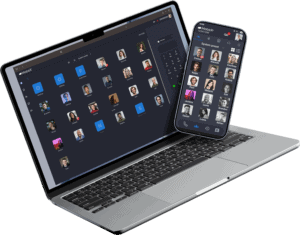
Not every employee works in the same way. Alongside MobeX Touch, users can access the MobeX desktop and mobile apps, allowing calls, contacts and business communications to follow them wherever they work.